
There are already more guides to ChatGPT Dots than there are marketers who have run one, and only two of them are courses in any real sense. Most of what exists is a setup walkthrough written for a general audience. If you want to learn what a dot does for a marketing team, here's what's worth your time and what each one leaves out.
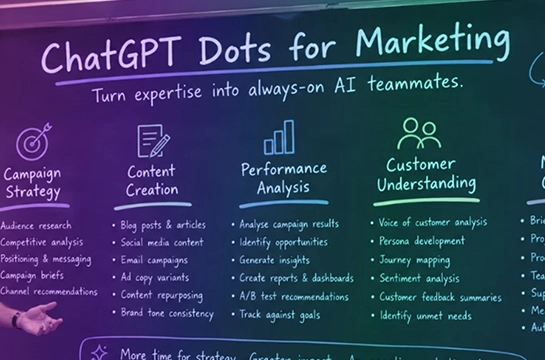
A quick definition for anyone arriving cold: a dot is OpenAI's always-on AI agent inside ChatGPT. You hand it a recurring job, it works through that job on a cloud computer of its own, and it messages you when there's something to review. We cover what it is, how to get it in the UK and ten marketing use cases in How to Use ChatGPT Dots for Marketing. This page is about where to learn it.
The list is numbered for reference, not ranked. Dots is changing weekly, so check the dates on anything you open.
We looked for resources that teach you to use a dot rather than report that it exists, that were checked against OpenAI's own documentation, and that say when they were last updated. We gave extra weight to anything written for marketers, and to anything whose author had run a dot rather than read about one. We left out launch news, the dozens of near-identical explainers that repeat OpenAI's press material, and general ChatGPT marketing courses that haven't been updated for Dots.
What it is: A 30-minute Sprint inside the SaaStrix community, written for B2B marketers and built on the AI-native marketing community's own research into Dots. It covers what a dot is, why it matters for marketing, what it does without asking and where it stops, five marketing use cases, how to get a dot in the UK, and a six-step setup with the real screens.
Who it's for: Experienced B2B marketers who want to run their first dot on real marketing work this week, and who would rather have five finished briefs than a feature tour.
Format and length: Twelve short text lessons with screenshots, in three sections: the essentials, five marketing use cases, and getting started. Under 30 minutes end to end. No video.
Made by: SaaStrix, written by founder Danny Asling, a CMO with 15+ years in B2B SaaS marketing leadership.
Cost: Included with SaaStrix membership at £29.95 a month or £299.95 a year. The five-day free trial covers it, so the Sprint can be finished before anything is paid.
Where to find it: saastrix.uk/community, then the Sprints section.
What stands out: The five marketing use cases each come with a prompt to copy. Every prompt is written as a responsibility brief: nine lines covering what the dot owns, what it may read, when it runs, what good looks like, and what it must never do. Those briefs cover turning one recording into a content pack, watching competitors' messaging, keeping launch materials consistent, having the weekly numbers ready for Monday, and logging customers' language word for word. The Sprint is also honest about the parts of the product that are awkward: the UK route is a Business Premium seat rather than the personal Pro plan, Custom rules aren't editable on every account yet, and sending isn't one of the actions a dot is required to clear with you first. Each of those shapes how the briefs are written.
What it leaves out: Anything outside marketing. If you want a dot for engineering tickets or personal admin, this isn't the course. It also doesn't yet report results from the five use cases running over time; that's in the pipeline as members run them.
What it is: OpenAI's own documentation: a getting-started article covering creation, task assignment, connected apps, scheduling, memory, Custom rules, pausing and resetting, plus a companion article on privacy, security and safety that explains which actions need approval and how the automatic review works.
Who it's for: Everyone with a dot. It's the source every other resource on this list is checked against, and it should be the first thing you read after the Sprint.
Format and length: Two web articles, each a 10-minute read. Updated as the product changes, without a visible date.
Made by: OpenAI.
Cost: Free.
Where to find it: help.openai.com, articles 20001530 (Getting started with your dot) and 20001529 (Dots privacy, security and safety FAQs).
What stands out: It's the only place the defaults are stated by the people who set them. The safety FAQ is where you learn that research and drafting happen without asking, which actions are gated, and how Custom rules work.
What it leaves out: Use cases, and anything about marketing. It tells you what the controls are, not what to do with them. The two articles also don't say when they were last changed, which matters for a product being updated almost daily.
What it is: A seven-step interactive guide from The Rundown, the AI newsletter, taking a beginner from creating a dot through Custom rules, a test run on sample project files, connecting live sources and scheduling a recurring task. Checked against OpenAI's launch documentation on 29 September and published the following day.
Who it's for: Beginners who learn by doing and want a sandbox before pointing a dot at anything real.
Format and length: Web guide with numbered steps, sample prompts and answer keys. Roughly an hour if you do the exercises.
Made by: The Rundown's editorial team.
Cost: The guide is free. The downloadable starter kit of fictional project files needs a Rundown University Pro membership at $29 a month (about £22; it bills in dollars).
Where to find it: app.therundown.ai/guides/how-to-use-chatgpt-dot.
What stands out: The practice-first design. Running a dot on fictional files before connecting your own Drive is exactly the order we'd recommend, and the answer keys let you check whether the dot did what you meant.
What it leaves out: Marketing. The exercises are project-management briefs, so you'll need to translate them to your own work. Our own test of Custom rules found the Add button greyed out on a Business account, so expect step two to depend on your plan.
What it is: An independent, unofficial guide to setting up and using a dot: creation on desktop, connecting apps, Custom rules, scheduling and mobile access, with starter prompts and an FAQ. Updated 30 September and checked against three OpenAI sources through 1 October.
Who it's for: Anyone who wants a plain, well-sourced walkthrough with no newsletter attached.
Format and length: One long web page with numbered steps and expandable FAQ sections. A 15-minute read.
Made by: The Dots Playbook editors, who state they're not affiliated with or endorsed by OpenAI.
Cost: Free.
Where to find it: dotsplaybook.com/how-to-use-openai-dots.
What stands out: The sourcing. Each claim is tied to an OpenAI page and the dates are stated, which is rarer than it should be for a product this new.
What it leaves out: Depth on any single job. The starter prompts include a weekly competitor research task, but they're one-liners rather than full briefs, and nothing on the page is written for a marketing team specifically.
What it is: A long evaluation guide for operations leaders deciding whether to run a dots pilot: workspace eligibility, seat costs, approval rules, governance controls, and how to scope a controlled pilot. Updated 1 October.
Who it's for: The person who has to approve a dot before marketing can use one. Send it to them.
Format and length: Eight-section web guide with FAQs, around 3,500 words. A 20-minute read.
Made by: Layer3Labs, reviewed by Jonathan West.
Cost: Free.
Where to find it: www.layer3labs.io/guides/chatgpt-dots-for-business.
What stands out: Its advice to restrict early pilots to bounded, read-heavy work where a person inspects every deliverable before anything goes out. That is the same rule the SaaStrix briefs are built on, stated from the governance side. It also uses a launch manager's dot rewriting marketing collateral when scope changes as one of its examples.
What it leaves out: The hands-on part. It's a guide to approving and governing a pilot, not to running one, and it quotes seat prices that differ from what OpenAI shows at UK checkout, so verify the numbers yourself.
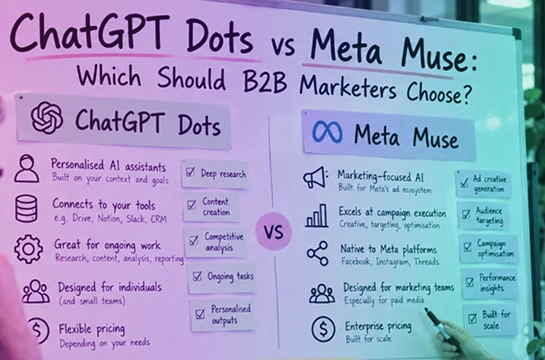
What it is: A practitioner's write-up after a week with a dot, comparing it with Meta's Muse, Claude and Gemini, and suggesting five marketing jobs: lead enrichment and routing, competitor ad monitoring, SEO position tracking with alerts, meeting brief assembly, and repurposing webinars in the background. Published 1 October.
Who it's for: Marketers who want one person's honest first impressions rather than a tutorial.
Format and length: A 2,000-word article with a comparison table. A 10-minute read.
Made by: AI Marketing Focus, an independent AI marketing blog.
Cost: Free.
Where to find it: www.aimarketingfocus.com/posts/openai-dots-for-marketers.
What stands out: It's one of very few pieces by someone who had actually run a dot before writing, and it's clear about what not to hand over: final brand-voice copy, high-stakes creative decisions and regulated data. Its routing rule, Dots for what runs when you log off and a chat assistant for what needs you watching, is a useful way to think about it.
What it leaves out: The how. There are no briefs or prompts, no setup steps and no UK access detail. Read it for judgement, then go elsewhere for method.
What it is: A long explainer from Emergent, an AI app-building platform, covering what dots are, setup, pricing, permissions, limits and sample responsibilities for small business owners, including a new-lead follow-up brief. Last updated 6 October.
Who it's for: Founders and small teams where the marketer is also the sales team.
Format and length: Long-form article with tables, FAQs and example briefs. A 15-minute read.
Made by: Emergent.
Cost: Free.
Where to find it: emergent.sh/learn/openai-dots.
What stands out: The example briefs are written as responsibilities rather than prompts, which is the right instinct, and the lead follow-up example (draft a reply from the pricing document, flag any lead unanswered after 48 hours) is a usable starting point for a small sales-and-marketing team.
What it leaves out: Marketing beyond lead handling, and any first-hand testing. It also quotes US prices that don't match the UK route, where the personal Pro plan doesn't include a dot at all.
What it is: An eight-lesson text course on dots fundamentals, permissions, Custom rules, scheduling and oversight, ending in a capstone where you write a delegation charter for your own dot. Verified against OpenAI's documentation on 30 September.
Who it's for: People who want a structured, general course with a graded progression, and who don't need it to be about marketing.
Format and length: Eight text lessons of 12 to 20 minutes each, about two hours in total. Desktop browser only.
Made by: FindSkill.ai, a course marketplace.
Cost: The first two lessons are free. The rest needs a FindSkill subscription, from $4.92 a month on an annual plan to $149 lifetime (about £115; it bills in dollars).
Where to find it: findskill.ai/courses/openai-dots-always-on-agent.
What stands out: The capstone. Writing a delegation charter before you connect anything is the same discipline as our responsibility brief, and two hours of structured lessons is more than most people will get from skimming guides.
What it leaves out: Marketing entirely. The examples are project trackers and general delegation, so every lesson needs translating to your own work. It's also the only resource here we haven't been able to review beyond the free lessons.
If you're a B2B marketer and want to be running a dot on marketing work by the end of the week, start with the SaaStrix Sprint. It's the only one of the eight written for marketers, the only one with finished briefs, and the five-day trial means it costs nothing to find out.
If you want to practise on fictional files before touching your own Drive, The Rundown's guide is the best sandbox, and the free part is enough.
If someone above you has to sign off the spend, send them the Layer3Labs pilot guide. It makes the case for a bounded, read-only first job better than most marketers could in a meeting.
If you want a second opinion from a marketer who has run one, read AI Marketing Focus. If you want the facts from source, keep OpenAI's two help articles open while you set up.
Whatever you start with, read OpenAI's safety FAQ before you connect a single app. The decisions you make in the first ten minutes are the ones a dot remembers.
Our recommendation is the obvious one, and we'd rather say it plainly than pretend otherwise: take the Sprint, give your dot one of the five briefs, and read the first few runs. Thirty minutes now is the difference between directing an agent this quarter and reading about other people doing it next year. Start the five-day free trial.
For B2B marketers, we recommend the SaaStrix Sprint. It is the only one of the eight resources reviewed here written for marketers and the only one with finished briefs, and it takes under 30 minutes. The five-day free trial covers it, so the Sprint can be finished before anything is paid.
A dot is the always-on AI agent from OpenAI inside ChatGPT. You hand it a recurring job, it works through that job on a cloud computer of its own, and it messages you when there is something to review.
Yes. The two OpenAI help articles, the Dots Playbook, the Layer3Labs pilot guide, the AI Marketing Focus write-up and the Emergent guide are all free. The Rundown guide is free without its starter kit, and FindSkill offers its first two lessons free.
Between 30 minutes and two hours, depending on the resource. The SaaStrix Sprint takes under 30 minutes, the two OpenAI help articles are a 10-minute read each, The Rundown guide takes roughly an hour with the exercises, and the FindSkill course runs to about two hours across eight lessons.
Yes. The UK route is a Business Premium seat rather than the personal Pro plan, which does not include a dot at all.
The Layer3Labs pilot guide. It is written for operations leaders deciding whether to run a pilot, and it covers workspace eligibility, seat costs, approval rules, governance controls and how to scope a controlled pilot. It quotes seat prices that differ from what OpenAI shows at UK checkout, so verify the numbers yourself.
SaaStrix is where B2B marketers become agentic marketing leaders, and you can try it free for five days.



.svg)