
Use ChatGPT Dots for the marketing work that comes round every week and rarely gets done properly: the competitor check, the Monday numbers, the webinar recording that was meant to become a month of posts. A dot is an AI agent inside ChatGPT that keeps working between conversations. You describe the work once, it runs on a schedule, and you review what comes back.
OpenAI launched Dots on 29 September 2026, and The Marketing Helm covered the announcement. Most of what has been written since is about personal errands: restaurant bookings, inboxes, travel. This guide is for B2B marketers. It covers what a dot is, how to get one, what it costs, and ten marketing use cases you could hand over.
The product facts here were checked against OpenAI's documentation and on our own dot. OpenAI is still changing the product, so we update this page when it does.
Last updated: 5 October 2026.
ChatGPT Dots is OpenAI's always-on AI agent. You may also see it called OpenAI Dots, and each person's agent is called a dot.
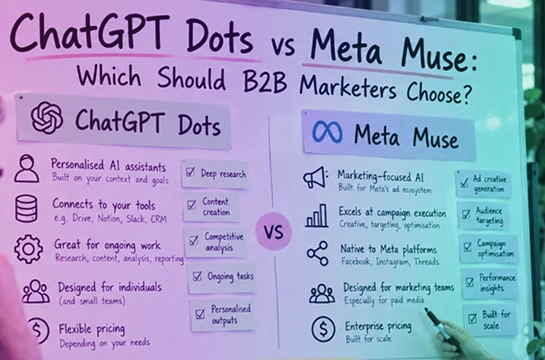
A dot is an AI agent inside ChatGPT that holds a standing responsibility and keeps working on it between conversations. You hand it a job once. It gets on with that job in the background and messages you when it has something to show you, or a decision it cannot make.
Here is how it differs from the ChatGPT you already use:
Each person gets one dot, and nobody else can direct it. OpenAI says teams of dots are coming and has given no date. Dots run on GPT-6 Astra, the model OpenAI released in September 2026.
Give a dot work that passes three tests: it recurs, it is mostly reading and drafting, and you can check the output in a few minutes. Marketing is full of work like that. Everyone agrees it should happen, and it is the first thing dropped in a busy week.
Start with these five marketing use cases. They span content, competitor intelligence, launches, reporting and customer research.
You ran a good webinar. The recording is sitting in a folder, and the posts it was meant to become were never written.
What the dot does: on a schedule you set, it checks a folder for new transcripts and turns each one into a pack of drafts in your voice: the strongest moments, show notes, LinkedIn posts and a newsletter section. Nothing is published. OpenAI uses this as one of its own examples of what a dot is for.
What you check: every quote against the transcript, and whether the drafts sound like you. A brand voice document, with examples of content you are happy with, does most of the work here.
A competitor swaps a published price for “Contact sales”, and your team hears about it weeks later from a prospect.
What the dot does: once a week it reads a short list of competitor pages with its own browser. It logs any change to positioning, pricing or packaging, quoting the old wording and the new. Nothing needs connecting, which makes this the simplest place to start.
What you check: keep the list to homepages, pricing pages, main product pages and changelogs. Some websites block AI agents, so ask the dot to tell you which pages it could not load.
A launch date slips by a week and the starting price changes. The landing page gets updated. The emails and the sales deck do not.
What the dot does: it checks every launch document against the current scope, date and price, flags any two that disagree, and drafts the fix. This is another of OpenAI's own examples.
What you check: tell it which document wins when two disagree, and name the person who approves a change. The dot suggests the fix. It should never edit a live document.
Monday's meeting is at ten, and the first hour of the day goes on copying figures out of four tools.
What the dot does: it gathers the week's figures and sets them against the week before, showing where each number came from. HubSpot and Salesforce have their own ChatGPT plugins. Google Analytics, Search Console, Google Ads and Meta Ads are reached through third-party plugins, and the LinkedIn Ads plugin is read-only. If a tool has no plugin, export its numbers to a sheet the dot can read.
What you check: tell it never to estimate a missing number. A gap in a leadership update is better than an invented figure. What the numbers mean is still your call.
Somewhere in your sales team's call notes is the way customers describe their problem in their own words. Nobody has had time to pull it out.
What the dot does: each week it reads new call notes, support tickets or reviews. It records recurring problems, common objections and customers' own phrases, quoted exactly.
What you check: this involves personal data, so speak to whoever looks after data protection before you connect anything. Give the dot a folder you have chosen, never your whole CRM or inbox.
These follow from what a dot is documented to do. Treat them as starting points to test in your own team.
6. Keep the leadership update current. The monthly marketing deck, refreshed as new numbers arrive, with a note when a figure has moved enough to matter. You still write the story.
7. Morning market briefing. A short list of trade publications and analyst blogs, read each morning, reporting only the items that meet a standard you have defined. Nothing needs connecting.
8. Pre-launch campaign check. Before a campaign goes live, the dot opens every link and checks the tracking links, dates and landing page against the campaign plan. It reports what does not match.
9. Battlecard upkeep. When the competitor log records a change, the dot drafts the update to your sales battlecards. A named person approves every claim before sales sees it.
10. Meeting prep briefs. Each morning, a one-page brief for the day's external meetings: who you are meeting, and what has changed since you last spoke. This needs your calendar and email connected, so it is the most sensitive job on the list. Add it last.
Members get the first five as ready-to-copy prompts, with the setup walkthrough screen by screen, in our 30-minute Sprint, ChatGPT Dots: AI Agents for Marketers. Start the 5-day free trial.
You brief it, the way you would brief an agency. That matters more than it did with ChatGPT. A vague prompt costs you one weak answer. A vague instruction to a dot costs you a weak result every week until someone rewrites it.
We call the format a responsibility brief. It has nine lines:
The line that carries the most weight is DECISION RIGHTS. This is the one from the content pack brief:
DECISION RIGHTS: Save drafts to [drafts folder] without asking. Never post, publish, schedule or send anything.
More than most people expect. A dot comes with defaults, and they are worth knowing before you connect anything.
Some decisions stay with you whatever you hand over: your positioning, the choice of campaign, and what you tell your leadership. A dot prepares the material for all three.
A dot has no price of its own. The first one comes with certain ChatGPT plans, and which plans depends on your country.
In the UK and Europe, the only self-serve option is a Premium seat on ChatGPT Business. A Business workspace has a two-seat minimum, so the cheapest set-up is one Premium seat and one Standard.
What it costs. OpenAI prices Business in US dollars and publishes no sterling price. Our UK card was charged in dollars, and the first monthly payment came to £138.65. That figure moves with the exchange rate. The US list price for the same two seats is $150 a month on monthly billing, or $120 a month on annual billing (paid as $1,440 up front), before tax.
How to buy it:
If your company already uses ChatGPT Business, your admin can move your seat from Standard to Premium. On Enterprise, your admin switches dots on.
Before you buy:
Dots will keep changing. If you are trying to keep up with how fast AI marketing moves, and want to see how other B2B marketers are using it, that is what SaaStrix, the AI-native marketing community, is for.
ChatGPT Dots is OpenAI's always-on AI agent inside ChatGPT. A dot holds a standing responsibility, runs on its own computer in the cloud, works to a schedule, uses the apps you have connected, and messages you when something is ready or needs a decision.
OpenAI launched ChatGPT Dots on 29 September 2026. It runs on GPT-6 Astra, the model OpenAI released earlier the same month.
You need an eligible ChatGPT plan: Pro (outside the UK, the EEA and Switzerland), a Business Premium seat, or an Enterprise, Edu or Healthcare workspace where an admin has switched dots on. It is not included with Free, Go or Plus.
There is no separate price. Your first dot is included with an eligible plan. The lowest-cost route in the UK is ChatGPT Business with one Premium and one Standard seat: $150 a month at US list price before tax. Our first monthly charge in the UK came to £138.65.
Yes, through ChatGPT Business with a Premium seat, or through an Enterprise workspace. Dots on the personal Pro plan are not available in the UK, the EEA or Switzerland.
Give a dot recurring marketing work you can describe once: turning a recording into a content pack, watching competitors' messaging, keeping launch materials consistent, preparing the weekly numbers and logging customers' language. Check its output before it goes anywhere outside your team.
It can. Sending is not on the list of actions that always need your approval, and an explicit request often counts as permission. State in every brief what the dot must never do, and add a Custom rule where your account allows it.
No. A dot gathers, checks and drafts. Positioning, the choice of campaign and what you tell your leadership stay with you. We cover the wider question in Will AI Replace Marketers? An Honest Answer for B2B Teams.
SaaStrix is where B2B marketers become agentic marketing leaders, and you can try it free for five days.



.svg)